2026 Software Comparison
Proposify vs Proposable
Both build proposals the traditional way, template first, filled in by hand. This comparison covers where each one is stronger, what each actually costs, and where Proposify vs Proposable vs Proposal.biz changes the decision entirely.
The Short Answer
Proposify and Proposable both ask you to build the proposal yourself, but they land in different places. Proposify's editor is genuinely polished, with advanced approval workflows and strong analytics, at the cost of monthly send caps on every tier. Proposable is simpler and includes native payment collection from its Team tier, but its editor is the more commonly criticised of the two, reviewers describe fighting the formatting, and some teams resort to code to get a clean result. Neither has AI document generation at any tier. Proposal.biz reads your website, drafts the document for you, and includes signing and payment on every plan without an editor to fight.
Pick Proposify if design polish and approval routing justify a send cap. Pick Proposable if you want a simpler, flat per-user structure with native payments and don't mind a harder editor. Pick Proposal.biz if you'd rather not build the document by hand at all.
Quick Verdict
Which One Is For You
Proposify vs Proposable looks like a price comparison. For most teams it's actually a question of which editor you're willing to fight. Start here.
Choose Proposify if
Approval workflows justify a send cap
You want a polished, design-led proposal editor with advanced approval workflows, and your monthly send volume comfortably fits under a tier's cap.
Choose Proposable if
You want a simple, flat structure with native payments
You want a simpler, flat per-user structure with native payment collection, and you're comfortable with an editor reviewers describe as difficult to format.
Three Numbers Worth Knowing
- Proposify Team, 3 users per month
- $123
- Proposable Team, 3 users per month
- $117
- Proposal.biz Professional, 3 users included
- $39
How Each One Builds the Document
Every other difference in Proposify vs Proposable follows from this. Both hand you a template to fill in by hand. One hands you a finished draft.
-
Proposify
Design-led editor, AI writing widget
- Pick a polished template and build the proposal out section by section
- Use the AI widget to prompt, refine, or fix grammar, it won't generate a full draft for you
- Configure branding manually
- Route through multi-step approvals if required
- Send, track, sign, collect payment, up to your plan's monthly send cap
-
Proposable
Template editor, no AI, format by hand
- Pick a template and fill it in by hand, there is no AI assistance at any tier
- The editor is widely described as difficult to work with, some teams drop into code to get a clean layout
- Configure branding manually
- Send, track, sign, collect payment from Team tier up
- Capped at 5 proposals a month on Solo
-
Proposal.biz
AI-first, URL to finished document
- Paste your website URL
- AI extracts brand, services, pricing, tone
- One prompt generates the full document
- Refine by chatting, not formatting
- Send, track, sign, collect payment
Proposify vs Proposable vs Proposal.biz at a Glance
| Feature | Proposal.biz | Proposify | Proposable |
|---|---|---|---|
| Built for | The full range of client-facing documents, generated by AI | Polished, design-led proposals | Straightforward, template-based proposals |
| Starting point | Your website URL, which becomes a finished draft | A template you build out by hand | A template you fill in, editor often described as difficult |
| Entry price | Entry price | Free forever, paid plan starts at $19/mo | $19/user/mo billed annually (Basic), 10 sends/mo | $19/user/mo (Solo), 5 proposals/mo |
| The tier most teams need | $39/mo billed annually, 3 users included | $41/user/mo billed annually (Team), 30 sends/mo | $39/user/mo (Team), unlimited proposals |
| Best suited to | Teams where drafting and branding is the slow step | Design-focused teams that need approval routing | Teams that want a flat structure and native payments |
| Main limitation | Monthly document allowances rather than unlimited sending | Monthly send caps on every tier, plus overage fees | No AI at any tier, and an editor users find difficult to format |
Full Feature Comparison
Most Proposify vs Proposable write-ups compare price alone and skip the editor experience, which is where teams actually feel the difference. This one names both. Ratings reflect how complete and accessible each capability is, not just whether it exists. Availability shown for each vendor's most commonly purchased paid tier.
| Feature | Proposal.biz | Proposify | Proposable |
|---|---|---|---|
| AI document generation from a prompt | Yes. Complete branded document from one prompt | AI writing widget assists, no full generation | No AI at any tier |
| Generate a document from a website URL | Yes | No | No |
| Automatic brand extraction | Yes. Logo, colours, fonts and tone from your URL | No. Manual setup | No. Manual setup |
| In-document AI you can chat with | Yes. Document Chat rewrites, shortens and retones | No | No |
| Editor | Drag-and-drop blocks plus AI editing by prompt | Polished, design-led drag-and-drop editor | Widely described as difficult to format, some teams drop into code |
| Document types supported | Proposals, decks, SOWs, NDAs, retainers, contracts, reports, one-pagers, webpages | Proposals and quotes, proposal-first focus | Proposals only |
| Engagement tracking | Opens, scroll depth and time spent per section | Strong section-level tracking | Standard proposal analytics |
| E-signatures | Yes, native, every plan | Yes, every plan, legally binding | Yes, every plan |
| Payment collection | Yes, inside the shared link | Yes, single payment processor | Native, single payment processor, from Team tier |
| Approval workflows | Not offered | Advanced, multi-step with deal-size triggers | Manager approval, Enterprise tier only |
| Send limits | Monthly document allowance, not unlimited | Capped per plan (10/30/75), overage fees beyond | Capped at 5/mo on Solo, unlimited from Team |
| Seat structure | Flat plans, no forced minimums | Per seat, no minimum | Per seat, no forced minimum |
| Product actively updated | Yes, shipping regularly | Yes, shipping regularly | Yes, shipping regularly |
A Note on the Editor Gap
Both tools require you to build the document by hand, but Proposable's editor is the more commonly cited pain point: reviewers describe formatting that fights back, and some teams resort to code to get a clean result. Proposify's editor is more polished but lands at roughly the same per-seat price once both are on their growth tier, and neither generates a first draft for you.
Free forever - No credit card.
Four Differences That Actually Change Your Week
Feature lists flatten everything into ticks. These are the four points in Proposify vs Proposable where the difference shows up in how your team actually spends its time and its budget.
Manual on Both Sides.
01 · Branding
Neither tool pulls brand assets from a URL; both require hand setup. Proposify's branding controls sit on its Business tier with more design depth. Proposable's are simpler and available from Solo, but simpler also means less control.
- Proposal.biz takes your URL once and pulls logo, colours, fonts, services, pricing, team bios, and case studies into a Smart Content Library that every document inherits automatically.
.BGG7K_t1_2eIJj2.webp)
Both Proposal-Only.
02 · Document Range
Proposify covers proposals and quotes with real design depth. Proposable is narrower still, its Enterprise tier adds departments and manager approval, but the document type stays proposals throughout. Neither extends naturally into contracts, SOWs, or NDAs.
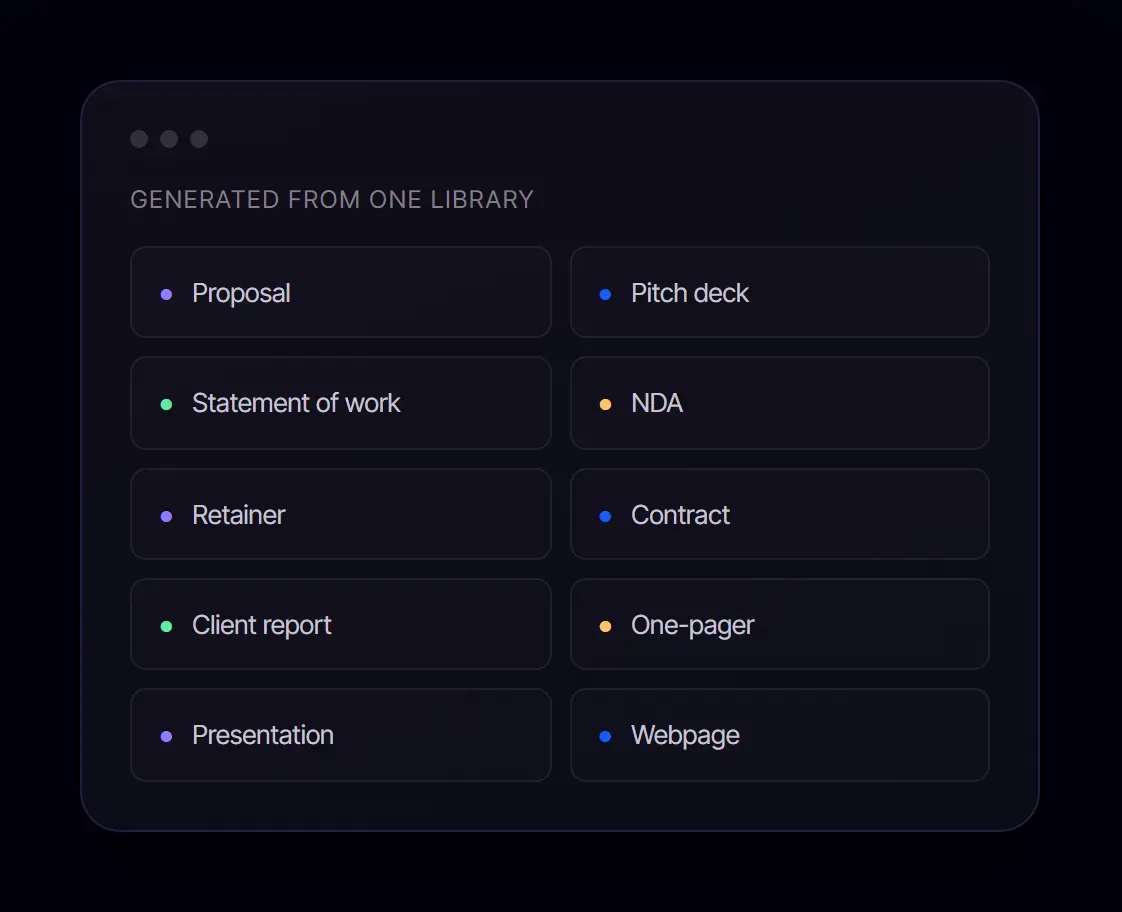
- Proposal.biz generates proposals, pitch decks, SOWs, NDAs, retainers, contracts, reports, one-pagers, and webpages from the same content library.
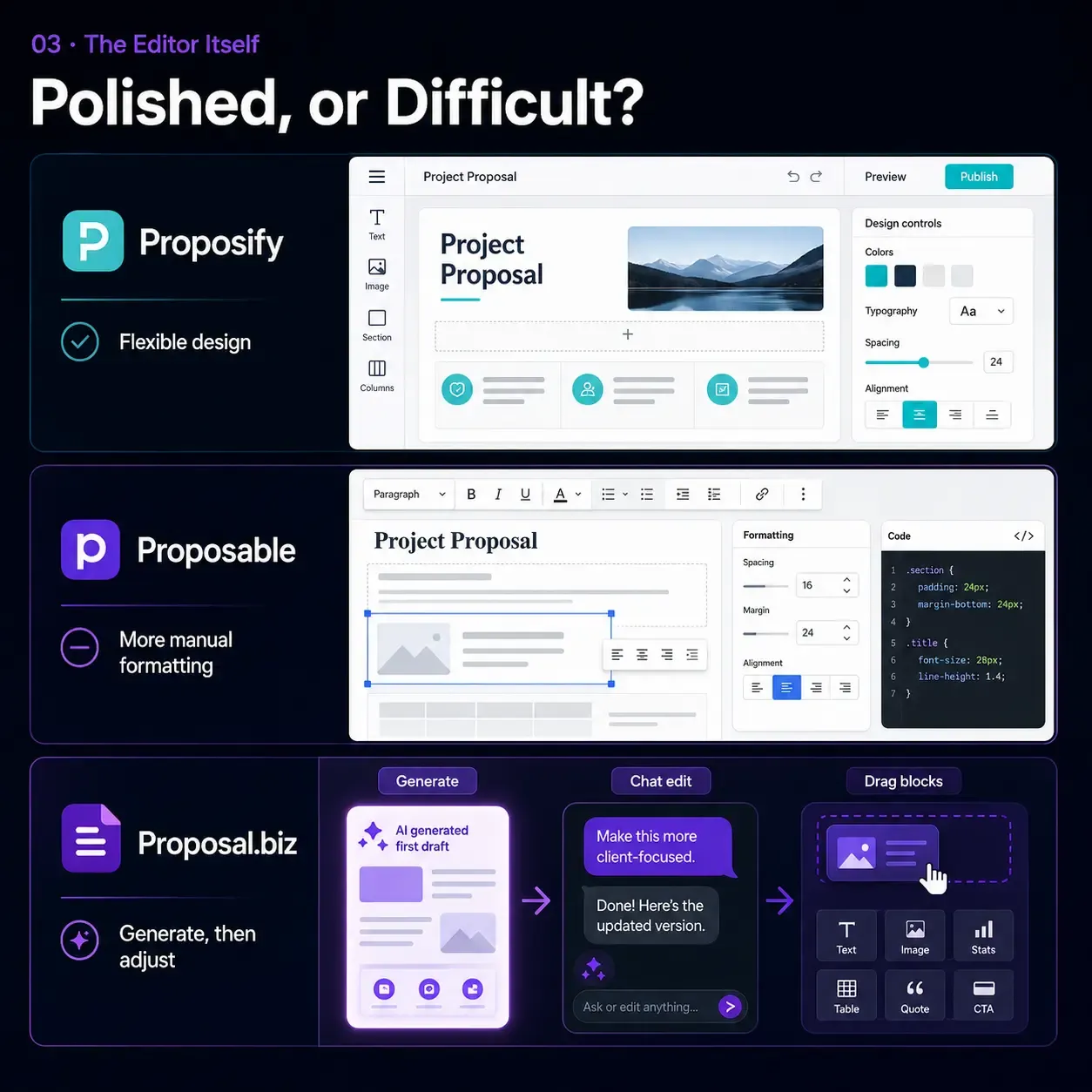
Polished, or Difficult?
03 · The Editor Itself
Proposify's editor is genuinely well-regarded for design flexibility. Proposable's is the more frequently criticised of the two: reviewers describe fighting the formatting, and some drop into code to get a clean look. Neither is fast, but one is meaningfully more pleasant to use.
- Proposal.biz removes the editor fight entirely: generate the draft, then adjust it by chatting or moving drag-and-drop blocks.
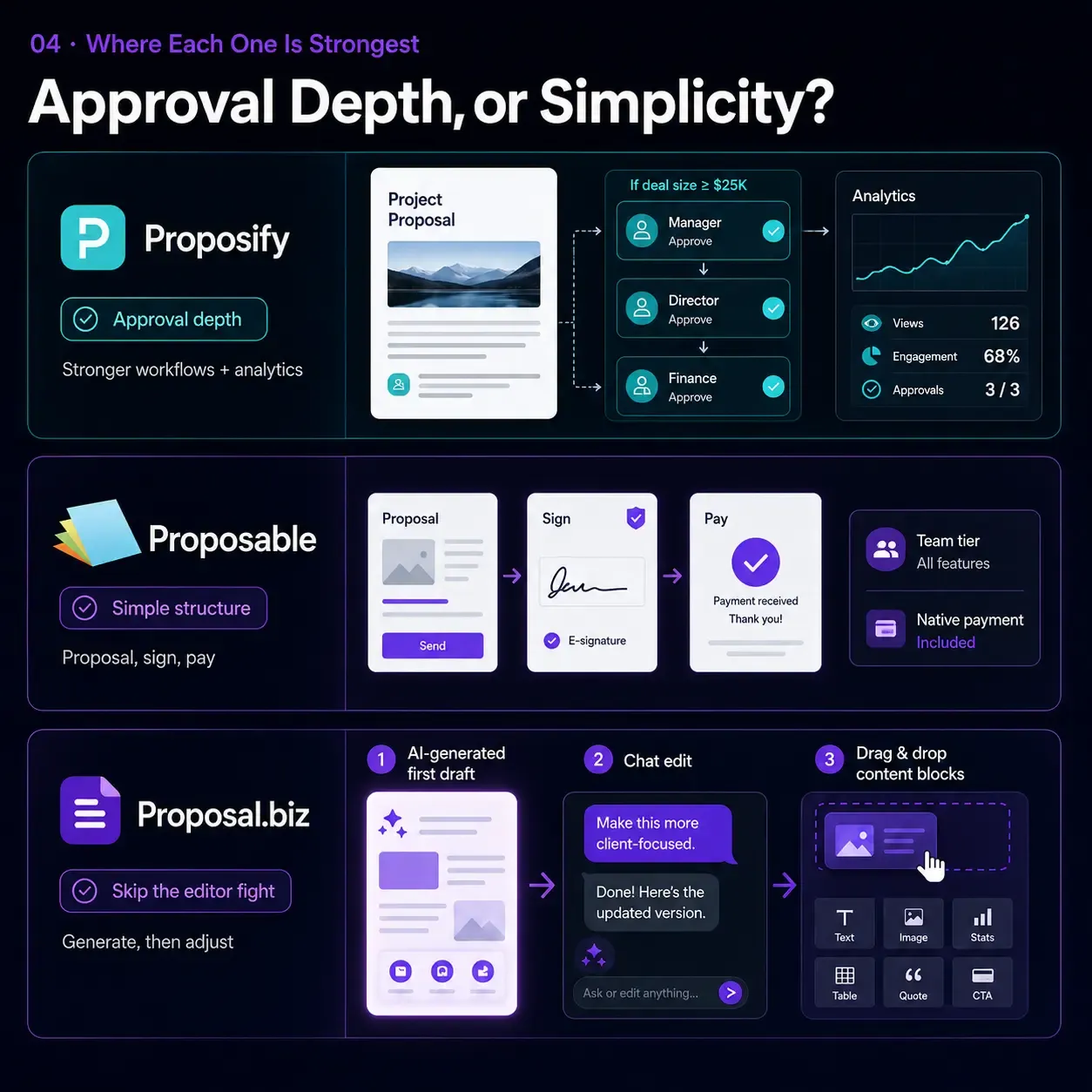
Proposify's Approval Depth, Proposable's Simplicity.
04 · Where Each One Is Strongest
Proposify's advanced, deal-size-triggered approval workflows and stronger analytics suit teams with real sign-off chains. Proposable's genuine strength is a flat, no-surprises structure with native payment collection from Team tier and no add-on fees, good for straightforward proposal-and-sign work that doesn't need deep process control.
- Be clear-eyed about which one you're actually buying. Two editors you build by hand, one more pleasant than the other, solve the same problem differently, and Proposal.biz solves it a third way: skipping the editor fight altogether.
Why Teams Choose Proposal.biz Over Proposify and Proposable
Same lifecycle as both, create, send, sign, get paid, starting from a faster place and without either editor to fight.
-
Smart Content Library: Your Brand, Pulled From Your URL
Where Proposify and Proposable both require manual brand setup, Proposal.biz reads your website and stores logo, colours, fonts, services, pricing, and tone as reusable blocks.
-
The Document, Written for You in Seconds
Proposify and Proposable both start you in a template you build out or fill in by hand. Proposal.biz generates the whole branded document from one prompt.
-
Edit by Chatting, Not Fighting a Difficult Editor
Ask Document Chat to rewrite, shorten, or retone a section, with no formatting battles and no dropping into code to get a clean result.
-
No Send Caps to Plan Around
Flat plans with a document allowance included mean your bill matches what you actually use, unlike Proposify's monthly send caps or Proposable's 5-proposal limit on Solo.
-
E-Signatures and Payment, Every Plan
No tier-gating: signing and payment collection are included from day one, not just from Team tier up.
-
Every Document Type, One Content Library
Proposals, decks, SOWs, NDAs, retainers, contracts, reports, and more, beyond either competitor's proposal-only focus.
Pricing Compared
Proposable vs Proposify on cost lands closer than most comparisons in this set, both charge roughly $40 a user a month at the tier most teams need. All figures reflect published list pricing as of 5 August 2026.
-
Pf
Proposify
Team tier, per user, billed annually
$41 /user/mo
- Included: 30 sends a month
- Included: Design-led templates and editor
- Included: Advanced, multi-step approval workflows
- Partly included: AI writing widget assists text only
- Not included: No brand extraction
- Not included: Overage fees apply past the send cap
-
Pr
Proposable
Team tier, per user
$39 /user/mo
- Included: Unlimited proposals
- Included: Standard CRM integrations
- Included: Native payment collection
- Included: Live team collaboration
- Included: Electronic signatures included
- Not included: No AI at any tier
-
Pb 3 users included
Proposal.biz
Professional, billed annually
$39 /month total
- Included: 3 users, 30 documents, 6,000 AI credits
- Included: AI document generation on every plan
- Included: Automatic brand extraction from URL
- Included: E-signatures and payment collection, native
- Included: Custom domain, branding removed
- Partly included: Monthly document allowance, not unlimited
What a Growing Team Actually Pays
Calculated from published list prices as of 5 August 2026, using each vendor's mid-tier plan.
| Team size | Proposify | Proposable | Proposal.biz | You save |
|---|---|---|---|---|
| 1 user | $41/mo | $19/mo (Solo, 5 proposals/mo cap) | $19/mo | 54% vs Proposify |
| 3 users | $123/mo | $117/mo | $39/mo | 67% vs Proposable, 68% vs Proposify |
| 10 users | $410/mo | $390/mo | $89/mo | 77% vs Proposable, 78% vs Proposify |
Proposify's paid tiers cap monthly sends, 30 on Team, regardless of seat count. Proposable's Solo tier caps you at 5 proposals a month before forcing an upgrade to Team. Proposal.biz plans include a monthly allowance instead: 10 on Starter, 30 on Professional, 100 on Business.
See full pricingWhat the Other Two Do Better
No tool wins every row of a Proposify vs Proposable comparison, and Proposal.biz is no exception. Here is exactly where it loses.
Proposify
- Included: Genuinely polished, design-led templates and editor
- Included: Advanced, multi-step approval workflows with deal-size triggers, and strong section-level engagement analytics
Proposable
- Included: A flat, predictable per-user structure with native payment collection from Team tier and no add-on fees, straightforward for teams that don't need deep process control
Who Should Pick Which
The right answer to Proposify vs Proposable changes with how much you value editor polish versus a simpler, flatter structure.
-
Freelancers and Solo Consultants
Proposable Solo at $19 a month caps you at 5 proposals, tight for anyone sending regularly. Proposify Basic at $19 a month billed annually offers a larger 10-send cap and more design polish at the same price. Proposal.biz Starter at $19 a month drafts the document from your URL instead of either template.
- Better cap for the same price: Proposify Basic
-
Agencies and Small Teams of Three to Ten
The pricing here is close, $123 a month on Proposify Team versus $117 on Proposable Team for three seats. Choose Proposable if a simpler structure and native payments matter more than design polish. Choose Proposify if approval routing and editor quality justify the small premium. Proposal.biz costs $39 a month for the same three seats and is the only one that drafts the document for you.
- Best value: Proposal.biz Professional
-
Mid-Market Sales Organisations
Proposify Business, for approval depth and higher send volume once you have a sales operations function to run it. Proposable Enterprise at $500+ a month flat becomes competitive once headcount is high enough to beat its per-user Team pricing.
- Winner: Proposify Business, with Proposable Enterprise worth modelling at scale
-
Enterprise and Regulated Industries
This is the closest matchup in this comparison set. Proposify Business adds approval depth and a large integration catalogue. Proposable Enterprise adds departments, department-level reporting, manager approval, and API access. Both are worth evaluating directly against your specific requirements.
- Winner: depends on requirements, model both against your actual needs
Frequently Asked Questions
-
Proposify is a design-led proposal editor with polished templates, advanced multi-step approval workflows, and monthly send caps on every tier. Proposable is a simpler, flatter tool with native payment collection from its Team tier, no AI at any tier, and an editor more commonly described as difficult to format.
-
They land close together at the tier most teams need, $41 a user a month for Proposify Team against $39 for Proposable Team. At the entry tier, Proposable Solo at $19 a month caps you at 5 proposals, while Proposify Basic at $19 a month billed annually allows 10 sends.
-
Proposify, by most accounts. Its editor is genuinely well-regarded for design flexibility. Proposable's editor is the more frequently criticised of the two, with reviewers describing formatting that fights back and some teams resorting to code to get a clean result.
-
Proposify, on its higher tiers. Team allows 30 sends a month and Business allows 75, both capped with overage fees beyond. Proposable removes its send cap entirely once you're on Team, unlimited proposals, though Solo caps you at just 5 a month.
-
Neither has meaningful AI. Proposable has no AI drafting, rewriting, or generation features at any tier. Proposify's AI writing widget assists with prompting and grammar, but doesn't generate a full document. Proposal.biz is the only tool among the three that generates a complete branded document from a prompt.
-
It depends on what the agency values. If a simpler structure and native payment collection matter most, Proposable's flat per-user pricing wins. If approval routing and design polish across client-facing work matter more, Proposify's editor and workflow depth justify the similar price.
-
Proposal.biz covers the same lifecycle of create, send, sign, and get paid, but is the only one of the three that generates a document from your website URL and a single prompt, with no editor to fight and no send cap to manage.
-
Yes. All three include e-signatures on every paid plan. Proposify's are legally binding by default. Proposal.biz records signed status and signing date and sends a confirmation email to both parties.
See the Difference in 60 Seconds
Paste your website URL. Watch Proposal.biz read your brand and draft a complete, branded document, no editor to fight, before you've finished picking a template anywhere else. No card required. Every plan includes AI generation, e-signatures and payments.
Free forever - No credit card.